




Product Description
StarTech.com DKT31CHDVCM laptop dock/port replicator Wired USB 3.2 Gen 2 (3.1 Gen 2) Type-C Black, Gray
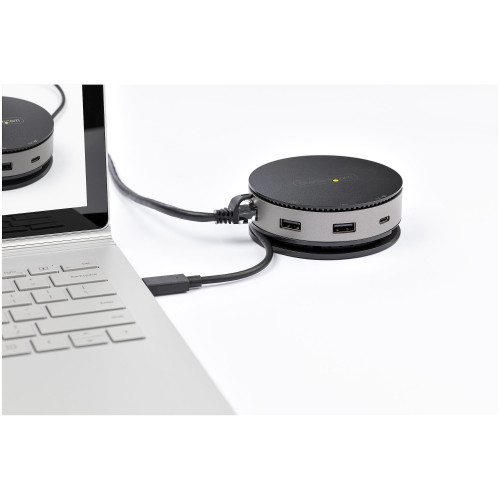
USB-C Docking Station | USB 3.1 Gen 2 | 4K 60Hz HDMI or DisplayPort | 1080p VGA | 75W PD Pass Through | 3 Port USB HubThis USB-C Gen 2 10Gbps multiport adapter, with backward USB-C laptop compatibility, turns your USB-C or Thunderbolt 3 Windows laptop, MacBook Pro, iPad Pro, Surface, Chromebook, or Android tablet into a workstation, anywhere you go. The USB 3.2 Gen 2 Type-C hub adapter features a unique portable, circular design and all of the essential connections
• HDMI, DisplayPort, VGA video options
• 10Gbps USB-C & USB-A peripheral ports
• Attached 24cm (10 in) USB-C host cable
Three Video Output Options
This USB-C multiport adapter features HDMI, DisplayPort, and VGA ports providing you with three single video output options for your workstation setup or boardroom presentations including support for an ultra-wide monitor.
• HDMI ( Up to 4K 60Hz with DP 1.4 and HDMI 2.0 HDR )
• DisplayPort ( Up to 4K 60Hz with DP 1.4 )
• VGA ( Up to 1080p)
Designed for Portability & Ease of Use
The USB-C travel dock features a compact circular design and an attached extended length 24cm (10 in.) host cable, accommodating a wide variety of setups. Bus-powered for most applications, there's no need to carry around a separate bulky power adapter. If extra power required, you can use your external USB-C laptop power adapter with support for up to 75W Power Delivery pass-through (15W for docking station & rest for charging).
Installation is fast and simple, with native support in most operating systems, and at only 7 ounces (198 g) and taking up less space than your smartphone, this dock easily fits in your laptop bag or briefcase with a convenient wraparound cable.
Essential Port Configuration
In addition to the video outputs, the portable USB-C dock gives you two 10Gbps USB-A ports and one 10Gbps USB-C port to connect the latest and legacy USB devices. The adapter also integrates a Gigabit Ethernet port to access a wired network.
Enhance Productivity and Device Management with the StarTech.com Connectivity Tools Application
Developed to improve performance and security, StarTech.com Connectivity Tools is the only software suite on the market that works with a wide range of IT connectivity accessories. The software suite includes:
•
Advanced Windows Layout Utility : To setup and save custom windows layouts.
•
Mac Address Pass-Through Utility : To improve network security.
•
USB Event Monitoring Utility : To track and log connected USB devices
•
Wi-Fi Auto Switch Utility : Enabling users to quickly access faster network speeds via wired LAN.
For more information and to download the StarTech.com Connectivity Tools application, please visit: www.StarTech.com/Connectivity-Tools
The StarTech.com Advantage
Warranty Information
30 Days WarrantyProduct Videos
Custom Field
Product Reviews
- Product images are for illustrative purposes only and the final product delivered may vary from the one shown above.
- In some cases, a product sold may arrive in different packaging than its original retail box. For bulk orders that are packaged together, product manuals or CDs may not always be available for each item.
- At checkout, the shipping cost is a general estimate which is subject to change depending on size/weight/quantity of ordered goods.
- Orders that contain end of life (EOL) products that are no longer in production may be replaced by a compatible product with the same FRU number offering same functionality.
- Refurbished printers may not have full ink cartridges or laser toners.
- Once an order is processed at our warehouse, it cannot be cancelled. A returned order will likely incur a restocking fee. See RMA page for details about restocking fees.
- Please note if you are concerned about any of the above conditions or have any question at all, we highly recommend that you contact us on sales@ithardwarediscounts.com or call 850-786-3447 before placing an order.


